



Search another article?
Configure a collector as a probe in SGBox
This section explains how to configure a collector as a probe in SGBox to monitor the status of the collector directly from the tenant where it is added.
Requirements:
- A collector must be deployed and configured. Look this section to see how to configure it.
Connect to the SGBox web interface.
Go under SCM > Network > Probe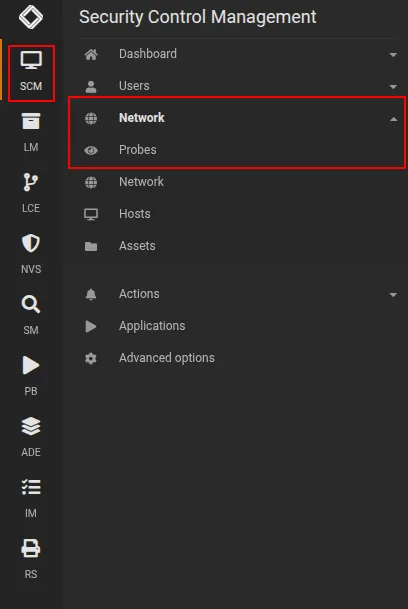
Click on ➕ Add new probe button and specify:
- Collector IP Address
- Collector Name
- Probe type: SGBox Standard Probe
- (optional) Network or networks that belong to this collector
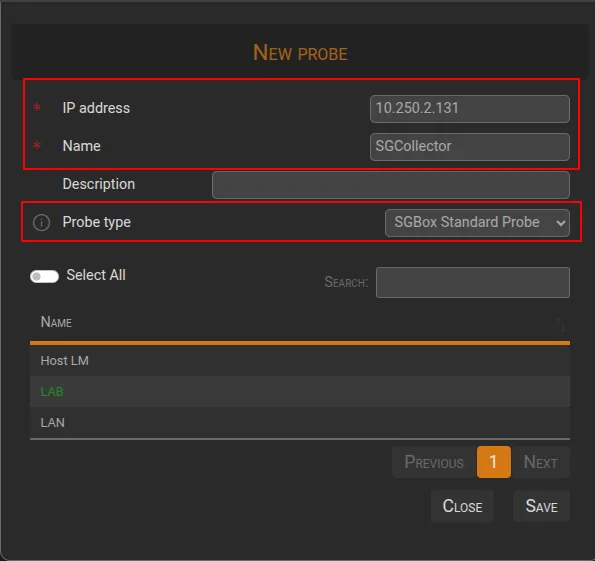
Click on SAVE in order to save configuration.
After a few minutes, information about the status of the collector should be displayed.