



Search another article?
Purpose of the syslog forwarder
The purpose of the Syslog Forwarder feature in SGBox is not merely log duplication, but the intelligent filtering and selective redistribution of security data.
The primary purposes are
- Centralization and Archiving (Compliance): Sending only critical or relevant logs to a long-term log server (e.g., a dedicated archive) to meet compliance requirements, reducing bandwidth and storage load by avoiding the transmission of “noisy” (informative/irrelevant) logs.
- Real-time Alerting and Notification: Forwarding specific alert events (identified via the Filter field) to dedicated incident response systems or monitoring dashboards, enabling a faster incident response.
- Noise Reduction: Acting as an “intelligent filter” between the network and another analysis system. Instead of flooding another server with millions of logs, SGBox analyzes the traffic and forwards only what is semantically important, thereby optimizing network and computing resources.
Installing the Syslog Forwarder Application
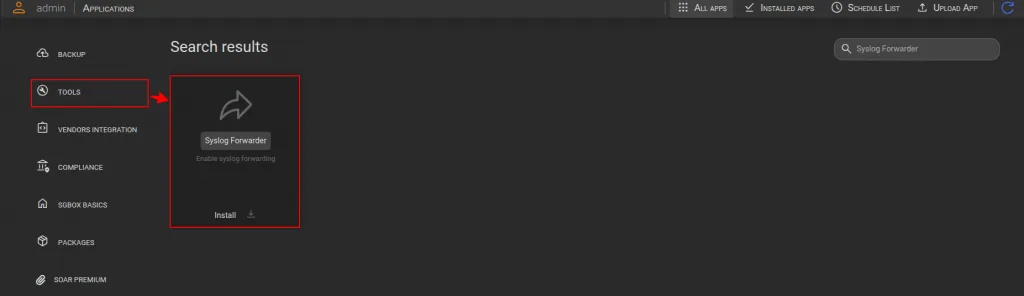
- Go to SCM > Applications > Tools > search for Syslog Forwarder and click the button Install (Download and install).
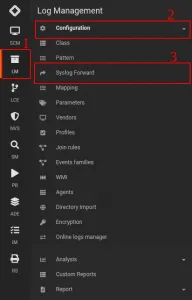
- Once the Syslog Forwarder app is installed, a new page named Syslog Forward will appear under the Log Management > Configuration module
Analysis of Key Points
The interface is divided into three main logical areas:
A. Configuration Area (Top Section)
This is the section where the user defines the parameters for the new forwarding rule. The fields present are:
- Name & Description: These allow for the identification and documentation of the rule
- Host & Port: These define the destination. The user specifies the IP address or hostname and the port (e.g., 514) to which the logs should be sent. Note that only TCP protocol is supported for reliability.
- Type: Indicates type of this rule. Type can be “Allow” or “Block”
- Filter (The core of the function): This is a text area where the user defines the selection criteria. Not all traffic is forwarded; only logs that meet specific parameters (e.g., logs originating from a certain IP or containing a specific error string) are forwarded or blocked.
B. Available Source List – “Hosts” (Bottom Left)
This table displays the sources of the data currently being monitored by the SGBox system. This list serves as a “database” from which the user can pull data sources on which forwarding rule filters will be applied.
C. Involved Source list Area (Bottom Right)
This list shows the data sources to which the rule we are defining will be applied.
How to define a log forwarding rule
In addition to identifying a target, the Host and Port fields allow you to decide which logs to send. Remember that only TCP protocol is supported for reliability purposes.
The “Filter” field is a free text field where the user can define regular expressions. This text allows for multiple regular expressions, one per line. These will be processed as “or” by the forwarding backend.
Here a few examples
- If the data source of interest is a firewall and you want to delete all dropped connections recorded by the firewall, you will need to select the “Block” type and insert the string “drop” into the text (assuming, of course, that the firewall identifies with the word “drop” as a blocked connection).
This way, only lines that do NOT MATCH “drop” will be forwarded to the destination syslog or, if you prefer, all the lines containing the “drop” word will be blocked.
The “drop” string entered in the “Filter” field is a simple regular expression. More complex regular expressions can also be used; for example, “d.rop” would produce the same result. Please refer to
- Conversely, if we enter the string “drop” in the “Filter” field but select the “Allow” type, SGBox will forward ONLY the lines containing the string “drop,” discarding all others.
- If we want to exclude lines containing “drop” and those containing “1.2.3.4,” we can do in 2 different ways
- We can specify this regular expression in the “Filter” field: drop|1.2.3.4
- We can alternatively write “drop” in the first line of the filter and “1.2.3.4” in the second. SGBox will then understand that it should exclude lines containing “drop” or “1.2.3.4”
- The simplest scenario is the following: I want to forward ALL traffic from the data source 192.168.1.1 to the remote syslog. To achieve this, I should select “Allow” as the type and write “.” (dot) in the filter field. “.” This is the simplest regular expression that matches any string. The result is that any log line from 192.168.1.1 will match “.” and be forwarded to the remote syslog.
Warning: The syslog forwarder function does not know the meaning of the logs it is forwarding and will simply apply the rules.
How to Apply a Forwarding Rule
When a rule is saved, it is automatically applied. It is possible to create multiple rules that operate on the same hosts, but this technique requires special care.
Suppose we receive a line like
firewall drop from 1.2.3.4
If a “Block” rule is created on a data source for the lines containing the string “drop,” that rule will prevent the forwarding of the example line.
However, if an “Allow” rule is subsequently created that allows the forwarding of logs containing “1.2.3.4” from the same data source, the line we wanted to block with the previous rule will now be forwarded.
Even if SGBox’s forwarding rule creation mechanism resembles that of firewall rules, it does not operate in the same way. All rules are applied to log lines, which may or may not be blocked.
For this reason, although it is possible, we recommend avoiding applying multiple rules to the same data sources to avoid unexpected results. Since it is possible to specify multiple regular expressions in a single rule, we recommend choosing this approach.