





Search another article?
The Online Log Manager
This guide explains how to import encrypted raw logs saved on the SGBox disk online, in order to analyze them from the Historical Search page.
Online Log Manager
LM -> Configuration -> Online Log Manager: this interface allows you to view, for each host, the number of encrypted logs stored on SGBox and the number of “online” logs stored (i.e., those present in the database and searchable via historical search). For one or more hosts, it allows you to transfer logs from encrypted to online status, making them visible in the historical search.
- Select the sources from which you want to restore the logs online for the historical search (e.g., 172.0.0.1).
- Select the desired time range.
- Select the sources by checking the corresponding box (flag).
- Click the “Transfer selected” button to start transferring the logs online.
Once this step is complete, the system will load the encrypted raw logs into the “Historical Search” section, making them available for consultation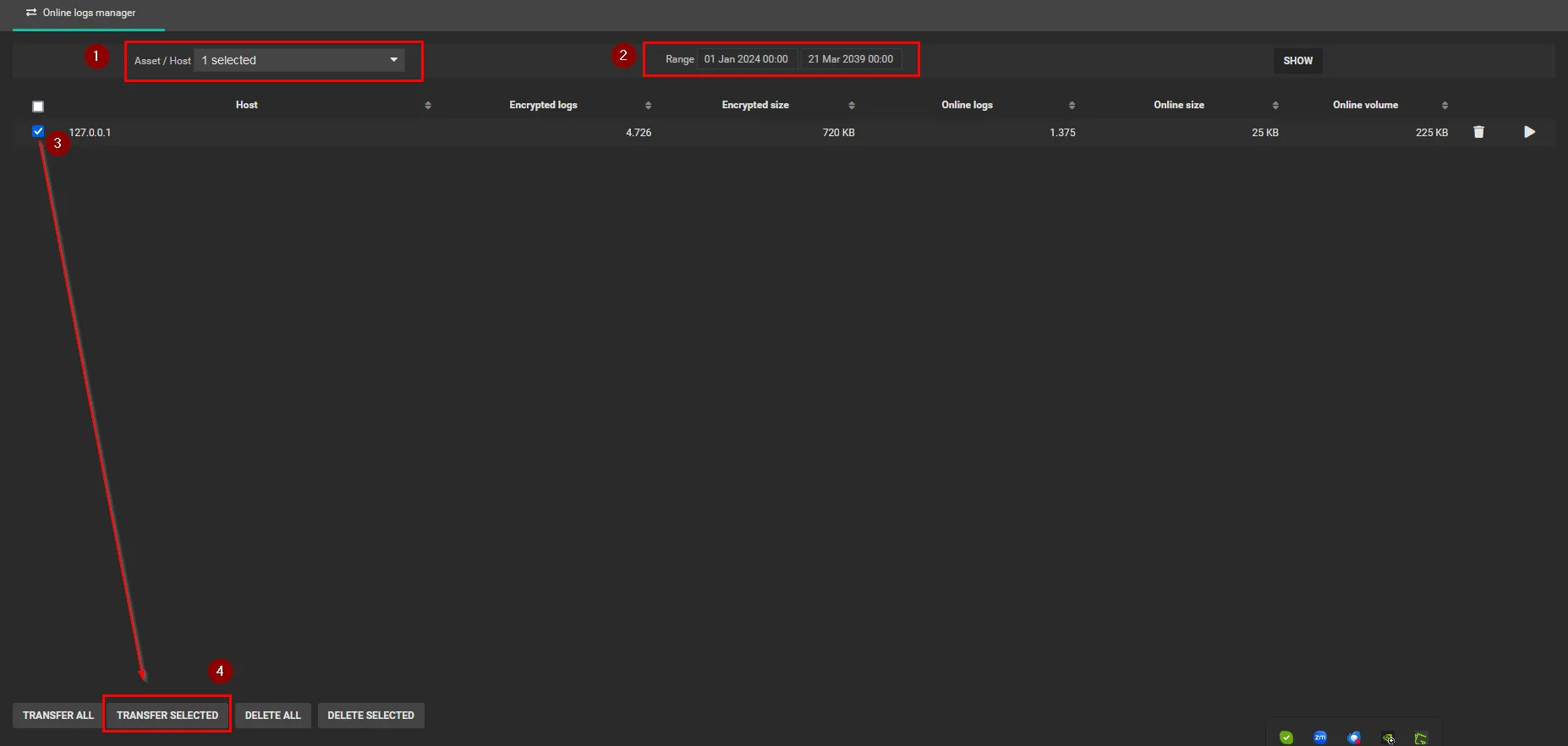
Important Note: By default, the advanced options include an active service called “Retains online raw logs of the last N days”, which archives logs in the historical search that are older than 30 days every day at 00:00. Therefore, before importing logs online, it is recommended to temporarily disable this service for the duration of your consultation to prevent them from being automatically re-archived.
⚠️ Warning: > Please note that when SGBox writes encrypted logs to the disk, they are compressed. This feature allows logs to be kept for the required retention period. Without it, managing and saving the traffic received from sources would be impossible, as it would require significantly more disk space on the appliance.
Using the Online Log Manager feature to bring archived and encrypted logs back online (for consultation via historical search) involves decompressing the files. As a result, a copy of the logs is imported which, in uncompressed format, can occupy up to 10 times the space of the compressed format.