
Search another article?
rSyslog (imfile module) read custom files
This article explains how to use rSyslog and its modules to collect logs in SGBox.
rSyslog (imfile module) Purpose
Using the imfile module (Input Module for Files), rSyslog can read any text-based file, regardless of its extension or internal format, as long as it contains line-oriented text.
rSyslog CAN read:
- Standard log files
*.log
- System logs (/var/log/…)
- Application logs
- Custom application files (Any text file generated by your own software)
myapp_output.txt
events.log
audit_data.txt
- Files with extension
The use of rSyslog (imfile module) to collect data in SGBox can ONLY be performed for the extension listed below, which has a valid timestamp at the beginning of the line, for example: 2018-08-12 11:05:48.
.txt
.log
.csv
Create an rSyslog config for a specific custom file
In /etc/ryslog.d/ add a file with priority like 60-myfileconfig.conf , this will be read after the main 50-default.conf file.
In this example, to read a Desktop log file:
$ModLoad imfile #Load the imfile input module
$InputFilePollInterval 2
$InputFileName /home/user/Desktop/events.log
$InputFileTag file-access:
$InputFileStateFile stat-file-access
$InputFileSeverity Info
$InputRunFileMonitor
$template file_log, " %msg% "

if $programname == 'file-access' then @10.25.2.68:514;file_log
if $programname == 'file-access' then stop
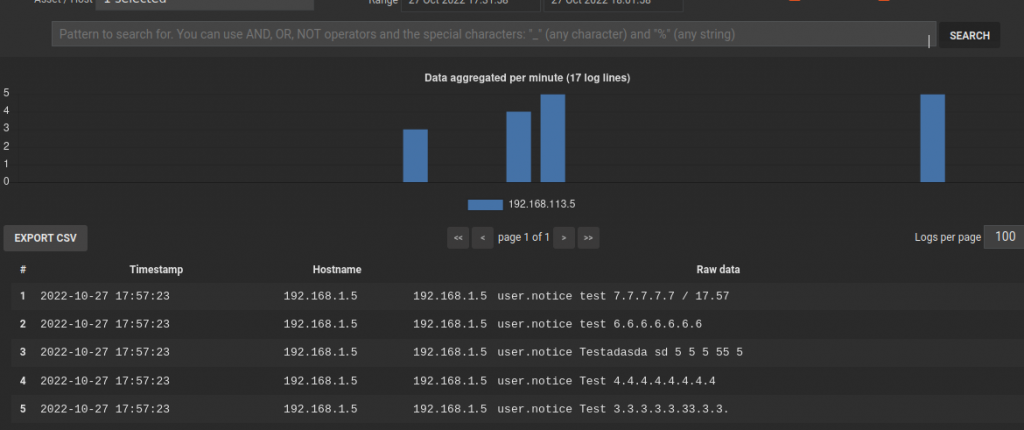
This configuration will read the file events.log and send it via syslog protocol UDP to the machine 10.250.2.68 .
The example content of the file events.log:
Test1 1 1 11 1 11 1
Test 2.2.2.2.2.2.2.2..2.2.2
Test 3.3.3.3.3.33.3.3.

Test 4.4.4.4.4.4.4.4
Testadasda sd 5 5 5 55 5
test 6.6.6.6.6.6.6
test 7.7.7.7.7 / 17.57
If no data timestamp is specified to the beginning of each line, there is the risk to have duplicated log.
See the results in LM > Analysis > Historical search