





Search another article?
This guide describes the installation and configuration of the MISP integration for SGBox. It enables users to make API calls, download feeds into SGBox, and perform cross-analyses between SGBox events and MISP data.
Enable integration with MISP
Generating an API Key
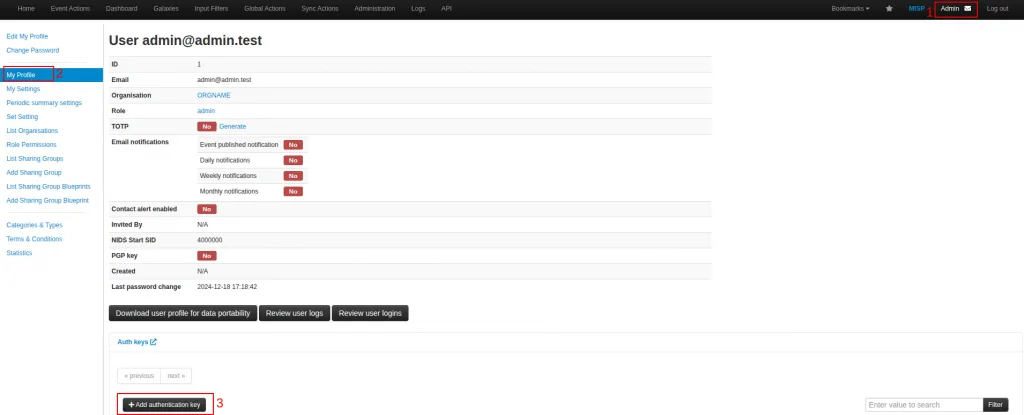
Access the MISP web interface as an administrator and go to User > Profile > Add authentication key.
- Set required parameter to generate an API key; user, comment (optional), Allowed IPs, Expiration of API.
Installing the MISP package
Go to SCM > Applications > SOAR Premium > search for MISP and click the button Install (Download and install).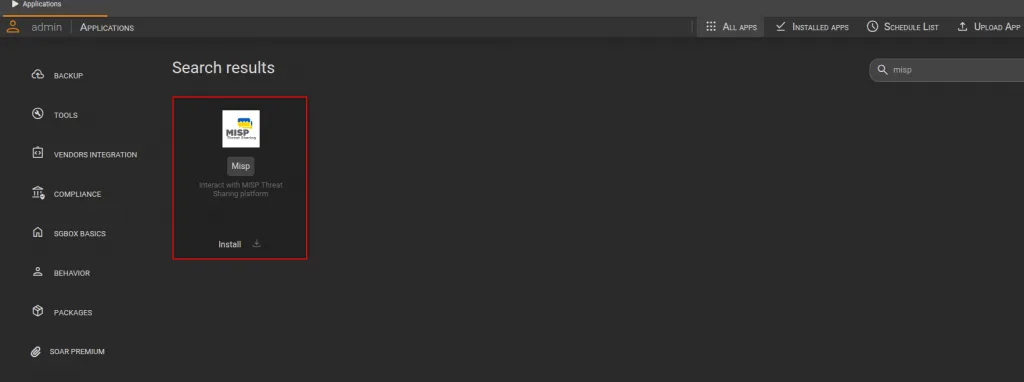
Configure MISP playbooks
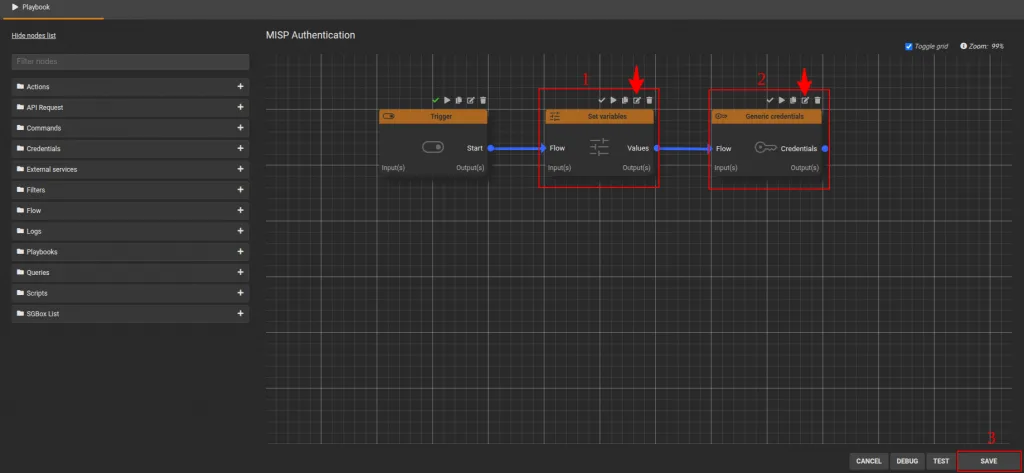
Go to PB > Playbooks and modify the Playbook named “MISP Authentication”
- Edit the “Set variables” node by entering the MISP IP address into the host field. Click the Save button to save the changes to the node.
- Edit the “Generic credentials” node by entering the API key generated in the “Generating an API Key” section. Click the Save button to save the changes to the node.
- To save all changes and exit the [MISP Authentication playbook, click the Save button..
On every PB Subflow
- MISP Add DST IP to SGBox list
- MISP Add SRC IP to SGBox list
- MISP Check IP on MISP
You must edit a node called Set variables and in the field Host insert MISP IP address, save the changes on the node by clicking the Save button.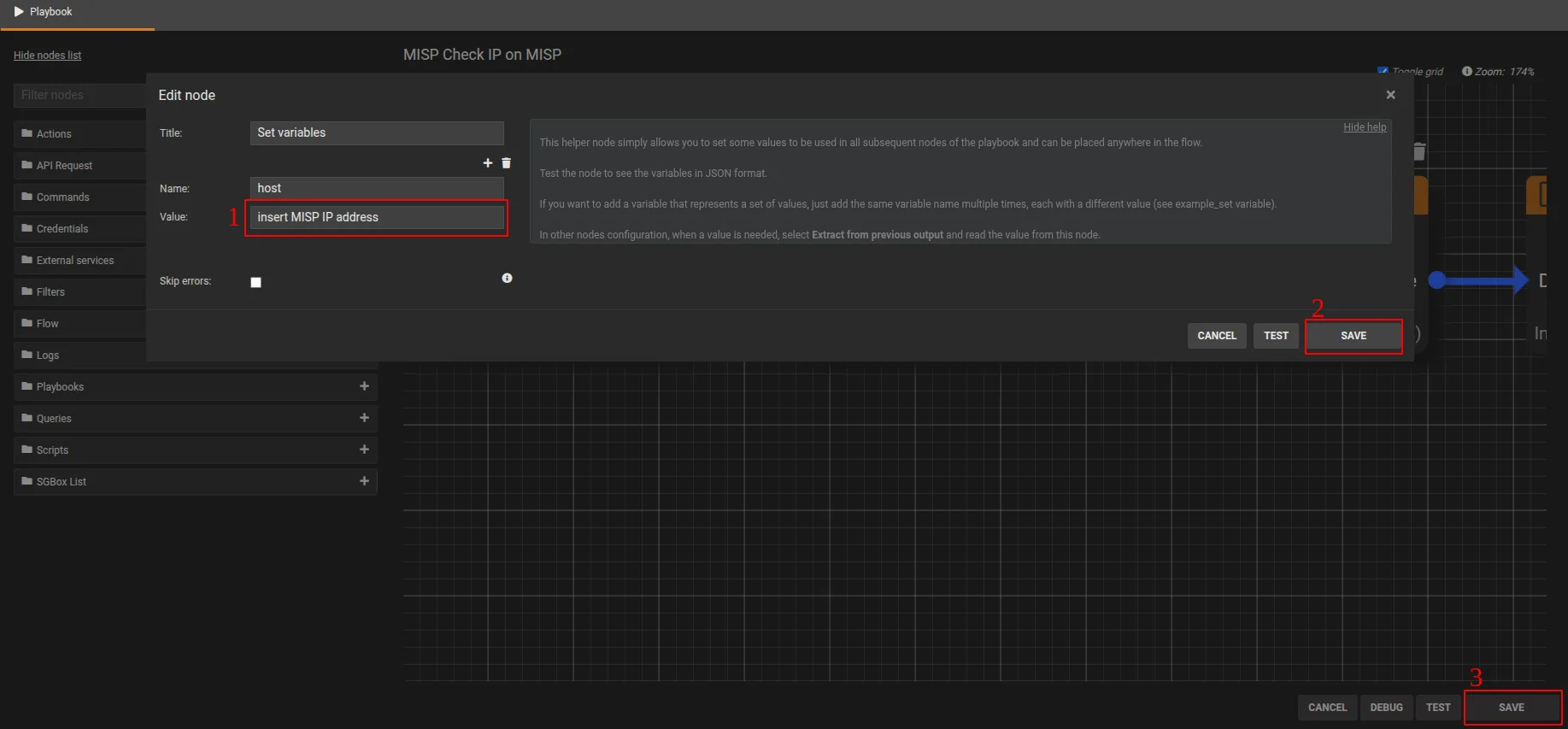
Using MISP integration in SGBox for data analysis
Once the MISP playbooks are configured and communication is established, these nodes can be used to download feeds from MISP into SGBox, or, perform cross-analyses between SGBox events and MISP data. See detail below.
Playbooks of MISP and Utility
Name | Description |
MISP Authentication | Main MISP playbook for API authentication |
MISP Add SRC IP to SGBox list | This playbook enables the import of the MISP SRC IP list into SGBox lists. |
MISP Add DST IP to SGBox list | This playbook enables the import of the MISP DST IP list into SGBox lists. |
MISP Check IP on MISP | Use this playbook to query MISP from the SGBox Dashboard or Class/Pattern analysis and verify if selected values (Source-IP/Destination-IP) exist in the MISP database. |
Import MISP feeds into SGBox
- GO to SCM > Actions > Lists > Feeds.
- Click the button ➕ New Feed.
Fill in the Name and Playbook fields, - Run a test; the result will be the list of values retrieved from MISP and imported into SGBox.
- Click the Create button to save the list in SGBox.
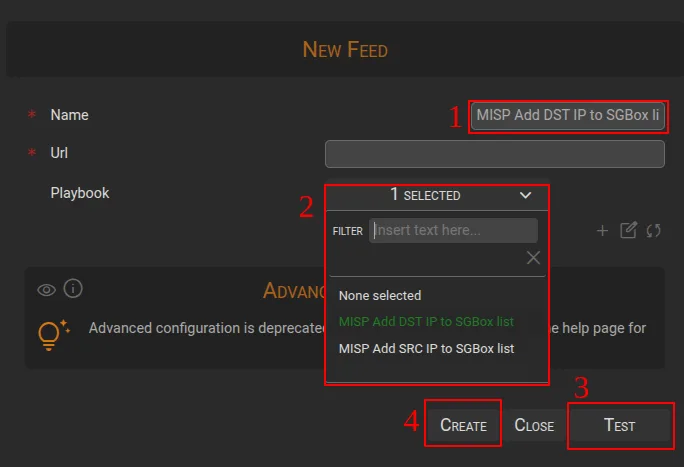
Once all the steps are completed, you will be able to see the imported feeds directly from the SGBox list.
- MISP feeds imported into SGBox can be used in the Log Management module; specifically within Event Querie, for example, to create event queries for filtering and analysis.
- MISP feeds can also be used in the Log Correlation Engine via Threat Intelligence Queries and Rules to create correlation rules that leverage these feeds
Perform cross-analyses between SGBox events and MISP data
In the SGBox Dashboard, you can use the MISP Check IP on MISP playbook to check if the IP values reported in an event are also present in the MISP database.
How to perform analysis
When connected to a dashboard containing IP values (IpAddress, SourceIP, DestinationIP, etc):
- Select the IP you want to analyze with your mouse cursor and right-click.
- This should show the option Send this value to a playbook. A window will open where you can select the MISP Check IP on MISP playbook.
- Click the RUN button to execute the call to MISP and verify if the selected IP is present in the MISP database.
The result will be displayed directly within the analysis window.